Small businesses always watch their spending. A website can help bring customers, build trust, and support sales. But many owners worry that getting a website means paying a huge amount.
You don’t need a large budget to get a website that looks neat and works well. Today, there are many affordable web design options with tools that are simple to use.
This guide covers:
- Top 10 low-cost services
- How to pick the right one
- Tips for better results
- Cost comparison chart
- SEO and growth benefits
Why Affordable Web Design Matters in 2025
A good website is no longer a luxury. It is needed for:
- Online visibility and customer trust
- Local search results
- Selling products or booking services
- Showing brand identity
Small companies now need a balanced solution:
Save money while still getting quality.
Affordable custom web design services, including Node.js web development services, custom CMS web design services, and WordPress web development services, give more control without the high price of big agencies.
Key Features You Should Look For
| Feature | Why It Matters |
| Mobile-friendly layouts | Most visitors use phones |
| Clear pricing | No surprise charges |
| SEO basics included | Helps ranking in Google |
| Good support | Help when stuck |
| E-commerce or booking tools | Suitable for stores or services |
| Security updates | Keeps website safe |
You can use these points to compare each service before choosing.
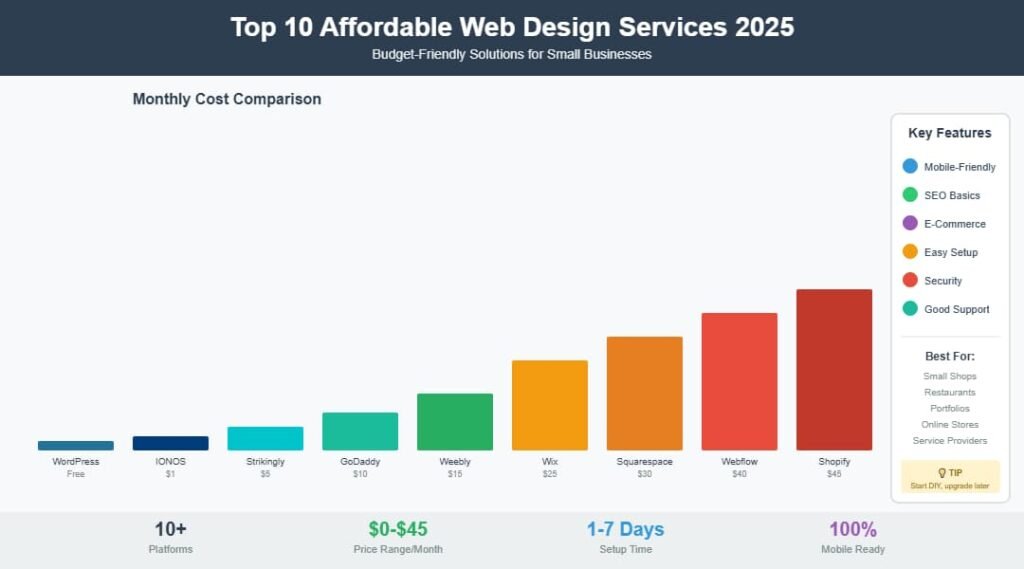
Cost Comparison Chart (2025)
Estimated monthly starting cost for main plans
$45 ┤ Shopify
$40 ┤ Webflow
$35 ┤
$30 ┤ Squarespace
$25 ┤ Wix
$20 ┤
$15 ┤ Weebly
$10 ┤ GoDaddy
$5 ┤ Strikingly
$1 ┤ IONOS
$0 ┼───────── WordPress
Note: Prices change by region and features.
Top 10 Affordable Web Design Services for Small Businesses
Wix
Simple setup and no need for coding
- Plan cost: Free to paid monthly plans
- Good for: Small shops, restaurants, salons
- Tools: Drag-and-drop editor, SEO basics, AI text help
- What stands out: Many ready themes
Nice choice if you want a fast launch.
Squarespace
Clean and neat designs
- Cost: Mid-range
- Best for: Creative and visual brands
- Bonus: Built-in gallery and online store options
Great for design lovers who want a smooth look.
WordPress
Huge flexibility for growth
- Cost: Free base + hosting cost
- Works well with:
- custom web design services
- custom web development services, AI integration,
- outsource web development services
- Node.js web development services (via custom backend)
- custom web design services
If you plan to grow with blogs, shop features, or booking tools, this is a strong pick.
Weebly
Low cost and easy for beginners
- Clear editor style
- Less design options than others
Good for smaller stores or service pages.
GoDaddy Website Builder
Quick build option
- AI-supported layouts
- Online appointment tools
- Limited editing controls
Fast but less flexible.
Shopify
For stores selling many products
- Best e-commerce platform
- Secure payment system built in
- Higher cost than others
Useful for small shops that need shipping + stock control.
Strikingly
One-page websites for simple needs
- Good for portfolios
- Light e-commerce
- Quick launch
Great for freelancers and personal pages.
IONOS
Cost-friendly bundle
- Free domain for the first year
- Hosting included
- Basic layouts
A value option for new businesses.
Elementor (For WordPress)
Design freedom with drag-and-drop controls
- No coding needed
- Custom blocks and layouts
- Good for full-service website design and management for small business teams
Perfect for those who want more control without deep coding.
Webflow
For advanced, detail-oriented control
- Best when a designer is involved
- Multi-page layouts
- Very flexible animations
Good for companies with future creative needs.
Quick Feature Check Table
| Platform | Easy to Use | Low Cost | E-Commerce | Advanced Custom |
| Wix | ⭐⭐⭐⭐⭐ | ⭐⭐⭐⭐ | ⭐⭐⭐⭐ | ⭐⭐⭐ |
| Squarespace | ⭐⭐⭐⭐ | ⭐⭐⭐⭐ | ⭐⭐⭐⭐ | ⭐⭐⭐⭐ |
| WordPress | ⭐⭐ | ⭐⭐⭐⭐ | ⭐⭐⭐⭐ | ⭐⭐⭐⭐⭐ |
| Weebly | ⭐⭐⭐⭐ | ⭐⭐⭐⭐⭐ | ⭐⭐⭐⭐ | ⭐⭐ |
| GoDaddy | ⭐⭐⭐⭐⭐ | ⭐⭐⭐⭐ | ⭐⭐⭐⭐ | ⭐⭐ |
| Shopify | ⭐⭐⭐⭐ | ⭐⭐ | ⭐⭐⭐⭐⭐ | ⭐⭐⭐⭐ |
| Strikingly | ⭐⭐⭐⭐⭐ | ⭐⭐⭐⭐⭐ | ⭐⭐ | ⭐ |
| IONOS | ⭐⭐⭐⭐ | ⭐⭐⭐⭐⭐ | ⭐⭐ | ⭐⭐ |
| Elementor | ⭐⭐⭐ | ⭐⭐⭐⭐ | ⭐⭐⭐⭐ | ⭐⭐⭐⭐⭐ |
| Webflow | ⭐⭐ | ⭐⭐⭐ | ⭐⭐⭐⭐ | ⭐⭐⭐⭐⭐ |
Side-by-Side View: DIY vs. Professional Help
| DIY | Professional Low-Cost Service |
| Cheaper start | Better branded results |
| Full control | Expert adjustments |
| Takes time | Faster delivery |
| You learn skills | Saved time for business tasks |
Many owners begin DIY and then upgrade later to custom web design services as they grow.
How These Services Support Growth
Small companies need features that support:
- Online payments
- Customer leads
- Search ranking
- Social media links
Affordable tools help with:
Better user experience → More visits → More conversions
Example: UX Improvements That Help Results
| UX Change | Effect |
| Clear “Call Now” button | More calls |
| Clean navigation | Visitors stay longer |
| Mobile menu | Works better on phones |
| Fast load speed | Higher search results |
| Easy forms | More leads |
These are strategies for small business website design and user experience that are easy to apply.
Popular Use Cases for Affordable Web Design
| Industry | What They Need | Good Option |
| Salons & clinics | Book appointments | Wix / Squarespace |
| Online stores | Payments & shipping | Shopify |
| Real estate | Photo galleries | WordPress + Elementor |
| Education | LMS, forms, login systems | WordPress (custom) |
| Startups | Simple branding site | Strikingly |
Also:
Custom web development services for educational platforms (interactive features) can be added later using WordPress plugins or Node.js apps.
Tips to Maximize Your Budget
- Choose a theme that fits your business style
- Write clear and simple content
- Add local SEO details (city, area, contact)
- Add social proof (reviews, badges)
- Use readable fonts and colour contrast
Keep your website simple; users should reach what they want in 3 clicks.
Ready-to-Use Checklist
✔ Mobile layout
✔ SSL security
✔ Business email
✔ Analytics installed
✔ Contact number easy to find
✔ CTA above the fold
✔ SEO title + meta description
✔ Fast hosting
You can print this and tick items as you go.
Conclusion
Each platform above offers value for different needs. The best choice depends on:
- Your budget
- Your skills
- Your type of business
- Needed features (e.g., e-commerce, booking, blog, LMS)
Affordable web design in 2025 gives you:
A clean, mobile site
Simple tools
Growth options for later
You can build the website yourself, hire a small support team, or outsource web development services when ready to grow bigger.
FAQs (Fresh content not repeated above)
Q1: Is free hosting recommended for business sites?
Free plans are okay for tests. Business sites should use paid plans for speed and security.
Q2: How long does it take to build a small business site?
A simple design may take 1–7 days, depending on content and setup.
Q3: What is the cheapest option with online store tools?
Weebly, Wix, and IONOS start low.
Q4: Can I add AI chat or automated tools later?
Yes. Many platforms support AI integration plugins and bots.