Online shopping has become the preferred way to buy everything from fashion to electronics. If you are planning to start an online store, a well-built e-commerce website is the key to attracting customers and driving sales. With the right structure, tools, and planning, you can turn your business idea into a fully functional store on the internet.
An e-commerce website is a digital store where users can browse products, add items to a cart, and pay online securely.
This guide explains each important step of e-commerce website development, including setup, design, essential features, SEO, cost, and launch checklist.
What Do You Need Before You Start an E-commerce Website?
Before jumping into e-commerce website development, you must set the foundation for a strong online business. This helps you avoid mistakes later and build a store that customers actually want to shop from.
Here are the key things you need to prepare:
- Market research: Understand the demand, pricing trends, product reviews, and gaps in the market. This helps you identify real opportunities.
- Competitor analysis: Study what other stores are doing well (and where they fail). Look at their website design, pricing, product presentation, and customer experience.
- Target audience needs: Know who you are selling to. Check their gender, age range, buying habits, preferred payment methods, and delivery expectations.
- Product selection and USPs: Choose products that solve a need. Highlight what makes your store unique, such as pricing, quality, fast shipping, or exclusive collections.
- Business branding and domain name: Create a memorable brand name and purchase a matching domain. Strong branding builds trust and helps customers remember you.
What Features Should an E-commerce Website Include?

A strong online store must offer a smooth, secure, and user-friendly shopping experience. Some features are essential from day one, while others improve convenience and conversion as you grow.
Below is a clear breakdown of must-have vs good-to-have features:
| Feature | Must-Have (Essential) | Good-to-Have (Improves Sales & UX) |
| Product pages | ✔ High-quality images, descriptions, pricing | ✔ Product videos, comparison, and wishlist |
| Search & filters | ✔ Search bar, category filters | ✔ Smart recommendations, search suggestions |
| Checkout & payment methods | ✔ Fast checkout, popular payment options, order confirmation | ✔ One-click checkout, saved cards |
| Mobile layout | ✔ Mobile-responsive ecommerce website design | ✔ Dedicated mobile app |
| Security | ✔ SSL, safe login, secure payments | ✔ 2-factor authentication |
| Customer support | ✔ Contact form, FAQs | ✔ Live chat or chatbots |
| Reviews & trust signals | ✔ User ratings, basic trust badges | ✔ Video reviews, verified customer photos |
Adding the right features based on your business size helps keep shoppers confident and encourages them to complete their purchases.
Which Platform Should You Choose for Your E-commerce Website?
Choosing the right platform is one of the most important decisions in ecommerce website development. Your choice depends on your budget, business size, and how much technical work you can handle.
Here is a simple comparison:
| Platform | Best For | Pros | Cons |
| Shopify | Small to medium stores | Easy setup, built-in payments, fast hosting | Monthly fees, limited design flexibility without apps |
| WooCommerce (WordPress) | Businesses needing content + ecommerce | Full control, many plugins, SEO-friendly | Requires hosting and more technical setup |
| Magento | Large & enterprise stores | Scalable, strong security, advanced features | Expensive to build and manage, a developer is needed |
| Wix | Small startups | Drag-and-drop design, beginner-friendly | Limited growth and customisation options |
| BigCommerce | Fast-growing brands | Strong built-in tools, multi-channel selling | Higher cost, more complex than Shopify |
| OpenCart | Mid-level technical users | Free to install, customizable | Extensions are required for many features |
How to Pick the Right Platform
Consider these points before choosing:
- Budget: Shopify and BigCommerce include hosting, but cost more monthly. WooCommerce costs less but may require paid plugins.
- Size of store: Startups do well on Shopify or Wix; bigger stores choose WooCommerce or Magento.
- Technical skill needed: Shopify and Wix require no coding. Magento and OpenCart require professional developers or a reliable e-commerce website development company.
Your platform should support your business today and handle future growth smoothly.
How to Develop an E-Commerce Website Step by Step
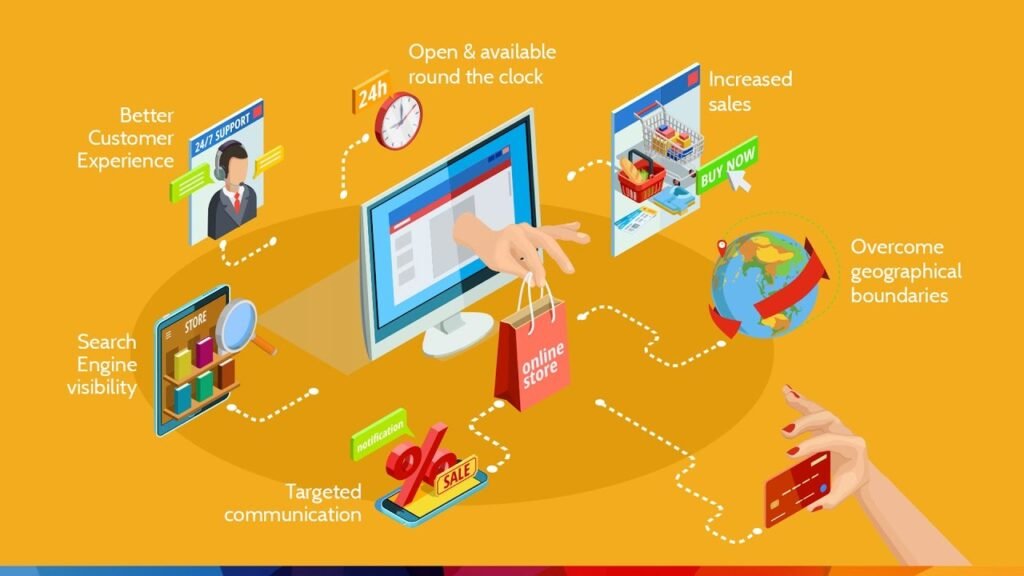
Once your plan is clear, you can move into practical e-commerce website development. The steps below give you a simple path from idea to a working online store.
1. Choose Hosting and Purchase a Domain
Your domain is your online identity, and hosting is the space where your website lives. Both affect performance, trust, and SEO.
- Pick a domain that is short, brandable, and easy to spell.
- Use a .com or a relevant country extension if you target a specific region.
- Choose reliable hosting (shared, VPS, or cloud) based on expected traffic and budget.
- Make sure the host offers good uptime, SSL support, backups, and quick support.
This is the technical base of your ecommerce website structure and should be chosen carefully.
2. Design Website Layout and User Flow
A good ecommerce website design guides visitors smoothly from the homepage to checkout.
- Navigation: Keep the menu clear with simple labels like “Shop,” “New Arrivals,” “Sale,” and “Contact.”
- Home page structure: Show key collections, bestsellers, trust badges, and clear calls to action.
- Product categories and filters: Group products logically and add filters like size, colour, price, and brand.
- Keep the layout clean so customers can find products in as few clicks as possible.
A clear structure supports both user experience and e-commerce website SEO checklist basics.
3. Add Products with Proper Structure
Your products are the heart of your store, so they need to be presented well.
- Product titles: Use simple, descriptive titles that include important details like type, material, or size.
- Descriptions: Write clear, benefit-focused descriptions that explain what the product does and who it suits.
- High-quality images and videos: Use multiple angles, zoom, and lifestyle photos wherever possible.
- Inventory management: Track stock levels so you do not sell items that are unavailable.
- Pricing accuracy: Make sure prices, discounts, and taxes are correct and consistent across all pages.
This level of detail is a core part of the e-commerce website requirements for any serious store.
4. Set Up Payment Gateways
Smooth payments are essential for conversion and trust.
- Offer popular payment methods such as credit/debit cards, wallets, and other local options.
- Use trusted providers that integrate easily with your platform.
- Enable order confirmation emails so customers feel secure after paying.
- Add basic fraud checks, such as address verification or 3D secure, to reduce risk.
A well-planned payment setup is a key step in any e-commerce development process.
5. Shipping and Delivery Setup
Your shipping rules must be clear before launch.
- Define shipping zones (local, national, international) and link them to the right prices.
- Choose delivery partners based on speed, coverage, and reliability.
- Offer options like standard, express, and free shipping above a certain order value.
- Show delivery times clearly on product and checkout pages to set the right expectations.
Good shipping logic supports better conversions and fewer support requests.
6. Website Security Essentials
Security builds trust and protects both you and your customers.
- Install an SSL certificate so your website runs on HTTPS.
- Use a firewall or security plugin to reduce hacking attempts.
- Keep your platform, themes, and plugins updated.
- Secure admin access with strong passwords and limited login attempts.
- Schedule regular backups so you can restore your site quickly if needed.
These steps help protect any custom e-commerce website development project from common risks.
7. Mobile Responsiveness
Most shoppers browse on mobile, so your website design with e-commerce must work perfectly on smaller screens.
- Use a responsive theme or template that adjusts layout for phones and tablets.
- Test menus, buttons, forms, and checkout on different devices.
- Keep text readable without zooming and avoid tiny clickable areas.
- Remember that search engines use mobile-first indexing, so mobile performance affects rankings.
A strong e-commerce website UI design on mobile can directly improve sales.
8. Add Legal Pages
Legal pages protect your business and build customer confidence.
- Privacy policy: Explain how you collect, use, and store customer data.
- Terms and conditions: Cover ordering, payments, limitations, and website usage rules.
- Return and refund policy: Clearly state return time limits, conditions, and refund methods.
- Add links to these pages in the footer and sometimes at checkout.
These pages complete the basic e-commerce website requirements and support long-term trust.
Why SEO Matters During Development

Search engines decide which stores appear first when people shop online. So, you must plan e-commerce website development with SEO in mind from day one. Fixing SEO later costs more time and money.
Here’s what to focus on during the build:
- Keyword mapping: Assign relevant keywords to the homepage, category pages, and product pages for better ranking.
- URL structure: Keep URLs short, clean, and descriptive to help both users and search engines.
- On-page SEO essentials: Add proper titles, headings, meta descriptions, and alt text on each page.
- Technical SEO basics: Improve website speed, add schema markup, fix crawl errors, and submit sitemaps for smooth indexing.
These early actions boost long-term visibility and help potential customers find your store easily.
Key SEO Elements to Implement
| SEO Element | Why It Matters | Tools |
| Page speed | Faster websites rank better and convert more | PageSpeed Insights, GTMetrix |
| Schema markup | Helps search engines understand product details | Rank Math, Yoast, Schema.org |
| XML sitemap | Ensures search engines index all your pages | Google Search Console |
| Image optimization | Reduces size without losing quality | TinyPNG, WebP tools |
| Clean URLs | Improves readability and user trust | Built-in platform settings |
Applying SEO correctly during development improves traffic and helps your store grow without relying only on paid ads.
How to Add Marketing Tools and Integrations
Marketing tools help you understand your visitors and turn them into loyal customers. Adding them during e-commerce website development makes tracking and sales optimisation easier from the start.
Here’s what to include:
- Email marketing tools: Connect platforms like Mailchimp or Klaviyo to collect emails, send abandoned cart reminders, welcome emails, and product updates.
- Analytics and event tracking: Add GA4 (Google Analytics) to track traffic and user behaviour, and install Meta Pixel to measure conversions from social ads.
- Remarketing setup: Enable tracking tags so you can target users who viewed products but didn’t buy, increasing the chance of conversions later.
These integrations support long-term growth and help improve your marketing decisions with real data.
What Mistakes to Avoid When Developing an E-commerce Website?
Small issues in e-commerce website development can lead to lost sales and low trust. Here is a simple checklist of common mistakes to stay away from:
- Complicated checkout: Too many steps, forced sign-ups, or confusing forms increase cart abandonment. Keep it short and simple.
- Slow website speed: Slow pages push users away. Compress images, use good hosting, and avoid heavy plugins.
- Poor product information: Low-quality photos or weak descriptions make shoppers unsure. Provide clear details and visuals.
- No trust elements: Missing reviews, policies, and secure payment signs make customers hesitate. Add visible trust badges and testimonials.
- Ignoring SEO and security: Without proper SEO, users can’t find your store. Without security, they won’t feel safe buying.
Focusing on user experience and trust helps you build a store that visitors feel comfortable buying from.
How Much Does It Cost to Develop an E-Commerce Website?
Costs for e-commerce website development vary based on size, features, and how much you handle yourself vs hiring professionals. Here’s a rough cost guide:
| Project Type | Approx. Cost |
| Small webshop | US $500 – US $2,000 |
| Medium store | US $3,000 – US $10,000 |
| Large enterprise shop | US $10,000+ |
What Affects the Cost
- Platform & hosting: Using a hosted platform or shared hosting costs less, while dedicated hosting or self-hosting raises costs.
- Design and customisation: If you use a basic template, the cost stays low. Custom design, premium themes, or custom UI add to the price.
- Number of products & complexity: A few products will be cheaper; hundreds of SKUs, variations, or complex inventory setups increase cost.
- Payment, shipping & integrations: Adding multiple payment gateways, shipping rules, analytics, and marketing tools raises development effort.
- Security & maintenance: Ongoing updates, backups, and security layers also add to long-term costs, not just initial build.
Final Checklist Before Launching Your E-commerce Website
Before going live, review everything carefully to ensure a smooth buying experience. Here’s a simple launch checklist for e-commerce website development:
- Speed testing: Check page load time on desktop and mobile. Fix any delays to keep shoppers from leaving early.
- Payment test mode: Make a test purchase to confirm orders, taxes, emails, and transaction flow work correctly.
- 404 issues: Scan your website for broken links, missing pages, or incorrect redirects.
- User testing: Ask a few people to browse, add products, and check out to catch any usability issues.
- Mobile check: Confirm that navigation, buttons, and forms work perfectly on different screen sizes.
Completing these checks helps ensure a smooth first impression for your customers.
After Launch: Tips to Grow Your E-commerce Store
Launching your store is only the beginning. To keep sales coming in, you must continue building trust and visibility.
Here are simple strategies to focus on after launch:
- SEO and content marketing: Keep improving rankings with targeted pages, blogs, and category optimisations following your e-commerce website SEO checklist.
- Social media: Promote products through engaging posts, ads, and collaborations on platforms where your audience is active.
- Reviews and loyalty features: Encourage verified reviews and add points or reward programs to increase repeat orders.
- A/B testing: Try different layouts, product titles, and button placements to see what improves conversions.
Conclusion
Building a successful online store requires smart planning, good e-commerce website design, and the right tools from the start. When you focus on strong structure, smooth shopping experience, security, and SEO, your store is ready to compete and grow.
If you want expert help with e-commerce website development, design enhancements, or SEO support, you can reach out anytime. I can help you build a store that not only looks great but also drives more sales.
FAQs
How long does e-commerce development take?
A simple online store can be completed in 1 to 3 weeks, while a large and custom setup may take 1 to 3 months, depending on design, number of products, and features.
Can I build an e-commerce website without coding?
Yes. Platforms like Shopify, Wix, and BigCommerce allow you to create a full store using drag-and-drop tools. However, custom e-commerce website development may require a developer for unique features.
Which platform has the lowest fees?
WooCommerce (on WordPress) has lower direct fees, but you must pay for hosting and plugins. Hosted platforms like Shopify charge monthly fees but include hosting and support in the cost.
Should I hire a developer or do it myself?
If your store is small and simple, you can launch it yourself using templates. For advanced features, branding, and scalability, hiring an e-commerce website development company ensures better performance and long-term results.